
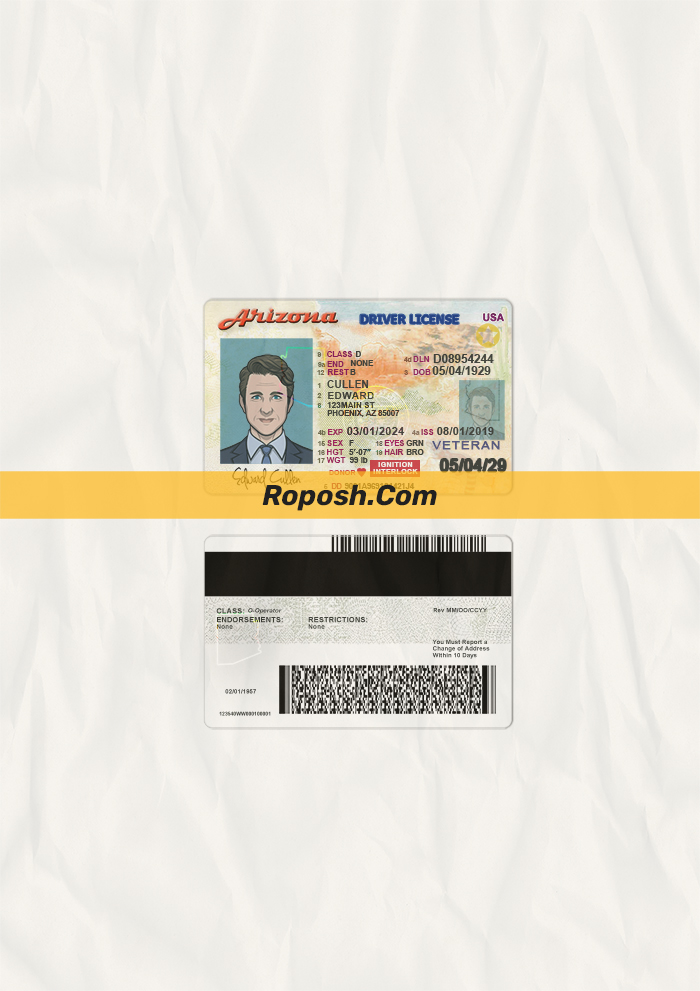


The Design Context
In professional graphic design and print production, having access to high-fidelity, editable templates is crucial for showcasing portfolio work, preparing educational mockups, or delivering precise client presentations. Accuracy in layout dimensions, edge sharpness, and font fidelity alleviates the common challenge designers face: achieving pixel-perfect results that replicate official document features without distortion or pixelation. The Arizona Driver License PSD Template caters to these needs by providing a meticulously crafted base file that serves as a reliable foundation for high-quality visual presentations.
Addressing Layout & Font Challenges
One frequent issue in editable template design is blurry or inconsistent text borders caused by rasterized layers or font mismatches. This PSD template combats these pitfalls through vector-sharp text borders and correct font embedding that adheres to Arizona driver license standards, ensuring all text elements maintain crisp outlines during editing and printing. Layer groups are logically organized with clear labeling for ease of navigation, reducing the risk of accidental misalignment or loss of detail. For further insights on optimizing editable license templates, review our guide on OCR-friendly Design which elaborates on technical aspects enhancing template usability.
Technical Specifications Deep Dive
This Arizona Driver License PSD Template is designed at a high resolution of 600 DPI in CMYK color mode, ensuring excellent print clarity and color fidelity tailored for professional print environments. The file employs Smart Object layers, facilitating non-destructive editing of photograph placeholders and graphical elements while preserving original vector paths. Vector shape layers are integrated to maintain scalable and edge-perfect text borders and icons, critical in adhering to exact layout dimensions defined by the official standards. For complementary document needs, consider expanding your asset collection with the editable utility bill PSD which matches print-ready and editable quality.
Editing Workflow & Customization
Customizing the template begins by opening the PSD file in Adobe Photoshop or compatible graphic software that supports layered PSD editing. Text layers are editable using the Character panel to replace placeholder content with the intended data while maintaining font consistency. Photographic elements reside within Smart Objects, allowing for simple replacement by double-clicking the Smart Object layer and inserting the new image, which updates instantly in the main file. Special care must be taken when editing specific fields such as the MRZ (Machine Readable Zone) or barcodes; these layers utilize vector paths with fixed positioning to sustain the correct structural integrity and standardized layout dimensions. To further enrich your design toolkit, explore the editable South American driver license PSD template for regional diversity in assets.
Exporting & Printing Best Practices
Upon completion of edits, export your artwork as a print-optimized PDF or high-resolution PNG to preserve vector sharpness and color accuracy. For physical mockups, select premium matte or satin-coated paper to reduce glare and enhance authenticity in printed proofs. These practices ensure that the final output maintains the crispness of vector layers and vibrant CMYK color profiles. To complement your identification template portfolio, consider incorporating additional legally illustrative assets like the editable official document PSD templates that extend your design versatility.
Layer & Field Breakdown
| Layer Group | Description | Editable? | Sample Data |
|---|---|---|---|
| Background | Static background design including security patterns and color gradients | No | N/A |
| Text Layers | All textual information including name, address, and license details | Yes | John Doe |
| MRZ Layer | Machine Readable Zone with vector text maintaining standardized format | Yes (restricted layout) | AZD1234567890 |
| Photo Placeholder | Smart Object with clipping mask for interchangeable ID photos | Yes | Portrait.jpg |
| Barcode & Security Features | Vector shapes representing encoded security elements | Yes | Barcode_01 |
Precision Editing for Professional Results
To achieve professional outcomes, adhere strictly to the layer naming conventions and avoid distorting vector layers, which could compromise print quality and design accuracy. Use only fonts supplied or specified in the template package to maintain exact font matching. Maintain the MRZ and barcode layers’ positioning and format to preserve structural standards, crucial for illustrative and educational display purposes. Regularly save layered PSD versions to safeguard your progress and facilitate iterative refinements.




Reviews
There are no reviews yet.